Managing WooCommerce products manually works fine — until your store starts growing.
Once you begin handling:
- supplier feeds
- large inventories
- variable products
- affiliate catalogs
- dropshipping synchronization
- multi-vendor imports
- bulk product updates
…the default WooCommerce importer quickly becomes limiting.
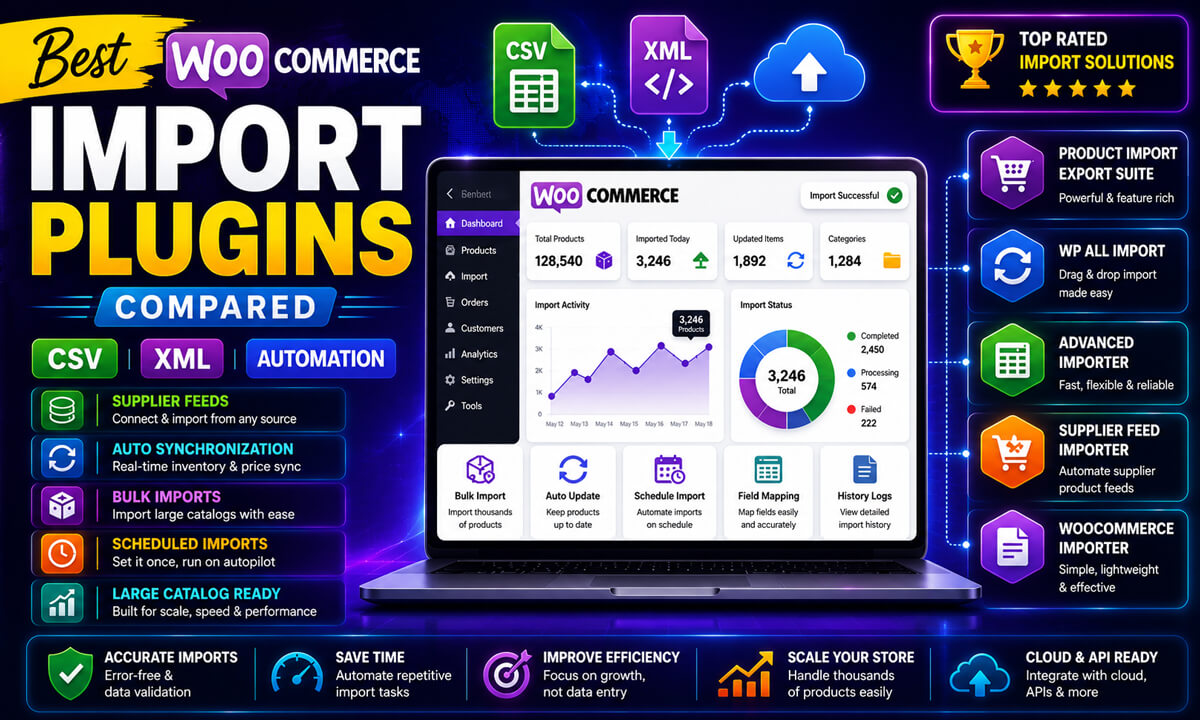
That’s where WooCommerce product import plugins become essential.
The right plugin can help you:
- automate imports
- sync supplier feeds
- reduce manual product management
- avoid duplicate products
- improve inventory accuracy
- scale large WooCommerce catalogs efficiently
However, not all WooCommerce import plugins are designed for the same workflows.
Some are ideal for beginners importing a few CSV files occasionally. Others are built for enterprise-level XML automation, scheduled synchronization, and massive product catalogs.
Choosing the wrong plugin can lead to:
- broken variations
- timeout errors
- missing product images
- failed cron imports
- duplicate SKUs
- poor scalability
In this guide, we compare the best WooCommerce product import plugins based on:
- CSV and XML support
- automation capabilities
- scalability
- ease of use
- variable product handling
- migration workflows
- custom field support
- performance with large catalogs
By the end, you’ll know exactly which WooCommerce import solution fits your store best.
Quick Comparison Table
| Plugin | Best For | XML Support | Scheduled Imports | Large Catalog Performance | Beginner Friendly | Starting Level |
|---|---|---|---|---|---|---|
| WP All Import | Enterprise automation | ✔ | ✔ | Excellent | Moderate | Advanced |
| Product Import Export for WooCommerce | WooCommerce-focused workflows | ✔ | ✔ | Very Good | ✔✔ | Beginner–Intermediate |
| WooCommerce Built-in Importer | Small stores | ✘ | ✘ | Basic | ✔✔✔ | Beginner |
| Product CSV Import Suite | Official WooCommerce workflows | ✘ | Limited | Good | ✔✔ | Intermediate |
| Import Export Suite for WooCommerce | Full store migrations | ✔ | ✔ | Very Good | Moderate | Intermediate–Advanced |
| WP Ultimate CSV Importer | Custom WooCommerce builds | Limited | ✔ | Good | Moderate | Advanced |
Quick Recommendations by Store Type
| Store Type | Recommended Plugin |
|---|---|
| Small WooCommerce Store | WooCommerce Built-in Importer |
| Large Product Catalog | WP All Import |
| Supplier Feed Automation | WP All Import |
| WooCommerce Migration | Import Export Suite |
| Affiliate Product Imports | WP All Import |
| Beginner Store Owners | Product Import Export for WooCommerce |
| WooCommerce Agencies | Import Export Suite |
| Custom WooCommerce Builds | WP Ultimate CSV Importer |
How We Evaluated These WooCommerce Import Plugins
To compare these WooCommerce import plugins fairly, we evaluated them based on real-world WooCommerce workflows rather than simply comparing feature lists.
Our evaluation focused on:
Import Flexibility
- CSV support
- XML support
- custom field importing
- variable product handling
Automation Capabilities
- scheduled imports
- cron jobs
- supplier feed synchronization
- automated inventory updates
Scalability
- performance with large product catalogs
- handling high-resolution images
- batch processing support
- server resource efficiency
Ease of Use
- interface simplicity
- learning curve
- field mapping experience
- beginner accessibility
WooCommerce Compatibility
- product variations
- attributes
- custom taxonomies
- third-party WooCommerce extensions
Real-World Reliability
We also considered practical WooCommerce issues such as:
- timeout errors
- duplicate products
- image import failures
- migration complexity
- supplier feed compatibility
This workflow-focused evaluation provides a more realistic comparison for actual WooCommerce store owners.
Understanding how WooCommerce product imports work is important before choosing an import plugin. The workflow below shows how modern WooCommerce import systems handle CSV/XML feeds, product mapping, automation, scheduling, and synchronization.
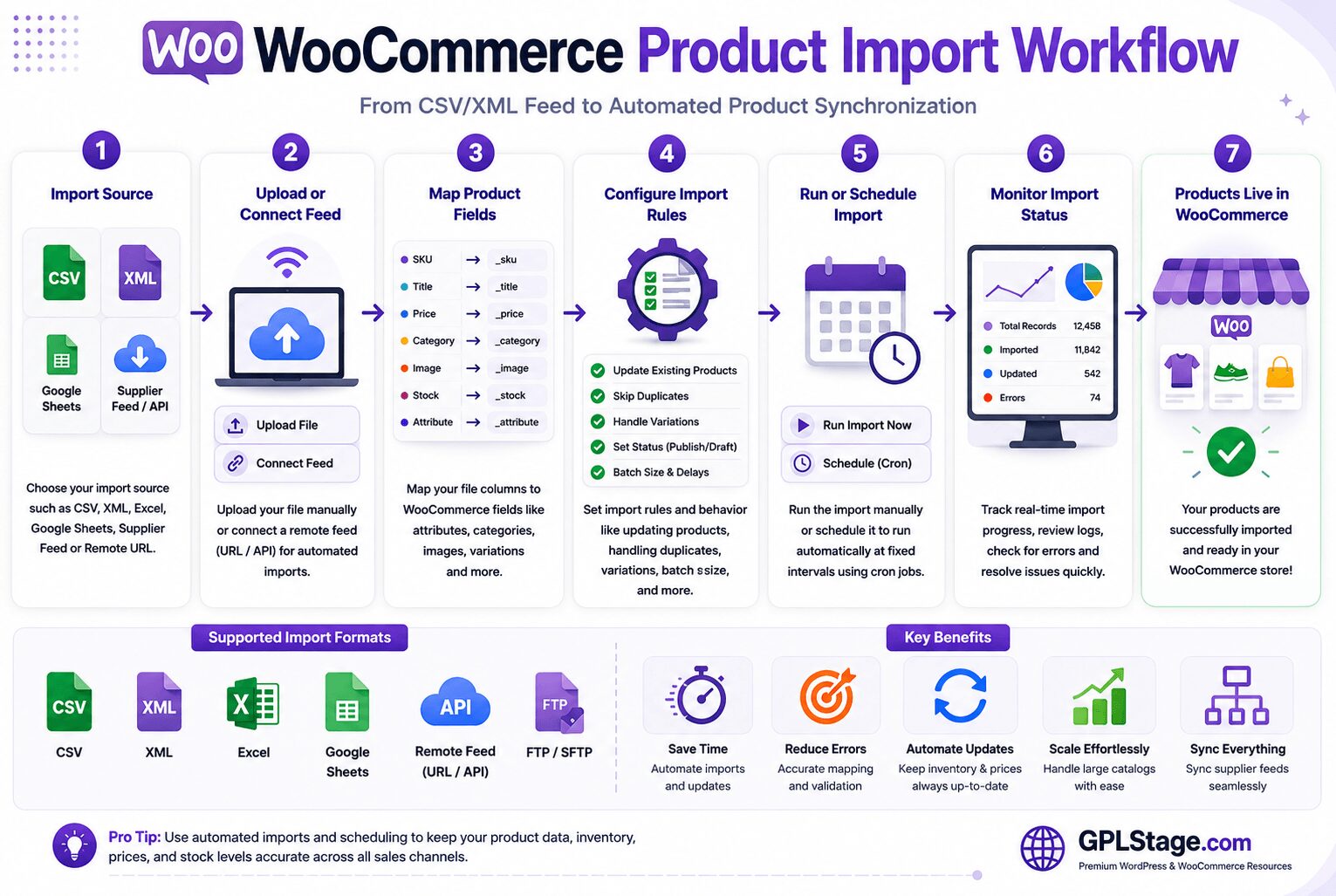
Most advanced WooCommerce import plugins follow a similar workflow structure involving feed connections, field mapping, import rules, scheduling, and product synchronization. However, enterprise-level plugins typically offer more advanced automation, XML support, and scalability features.
1. WP All Import — Best Overall WooCommerce Product Import Plugin
WP All Import is still the most powerful WooCommerce product import plugin for advanced store operations.
Unlike lightweight importers that require strict CSV formatting, WP All Import gives you complete drag-and-drop control over product mapping.
This makes it exceptionally flexible for:
- supplier XML feeds
- ERP integrations
- marketplace synchronization
- dropshipping automation
- affiliate product imports
- inventory synchronization
It supports:
- CSV
- XML
- Excel files
- Google Sheets
- remote feeds
- scheduled imports
Key Features
✔ Advanced drag-and-drop field mapping
✔ XML and CSV support
✔ Scheduled cron imports
✔ Variable product support
✔ Bulk image importing
✔ Custom field compatibility
✔ WooCommerce extension support
✔ Conditional import logic
Recommended For
✔ Large WooCommerce stores
✔ Supplier feed automation
✔ Dropshipping stores
✔ Affiliate product catalogs
✔ Enterprise WooCommerce workflows
✔ Large XML imports
When This Plugin Is NOT Ideal
WP All Import may not be ideal for:
- very small stores
- beginners wanting simple imports
- users performing occasional one-time CSV imports
- store owners uncomfortable with advanced mapping workflows
Smaller stores may find simpler WooCommerce-focused importers easier to manage.
Real-World Performance Insights
For stores importing thousands of products, WP All Import performs significantly better than most lightweight WooCommerce importers because it supports:
- batch processing
- scheduled imports
- advanced mapping logic
- scalable import workflows
However, large imports still require strong hosting resources.
Stores importing:
- massive XML feeds
- high-resolution product images
- complex variable products
…may still encounter:
- PHP memory exhaustion
- server timeouts
- cron delays
- image processing bottlenecks
This is where WooCommerce hosting quality becomes extremely important.
Pros
✔ Extremely flexible
✔ Excellent automation support
✔ Enterprise-level capabilities
✔ Powerful XML handling
✔ Excellent scalability
Cons
✘ Premium pricing
✘ More advanced learning curve
✘ Can feel overwhelming for beginners
2. Product Import Export for WooCommerce — Best WooCommerce-Focused Import Plugin
Product Import Export for WooCommerce focuses specifically on WooCommerce workflows instead of trying to be a universal WordPress importer.
That specialization makes it easier for many WooCommerce store owners to handle:
- product imports
- exports
- inventory updates
- category imports
- migration workflows
The interface is cleaner and less intimidating than enterprise-focused import plugins.
Key Features
✔ WooCommerce-focused interface
✔ CSV and XML support
✔ Scheduled imports
✔ Product synchronization
✔ Variable product support
✔ Bulk category importing
Recommended For
✔ Beginner-to-intermediate WooCommerce users
✔ Mid-sized product catalogs
✔ Routine inventory updates
✔ WooCommerce migrations
✔ Store owners wanting easier workflows
When This Plugin Is NOT Ideal
This plugin may not be ideal for:
- enterprise-level automation
- highly customized import logic
- advanced XML feed mapping
- complex supplier synchronization systems
Very advanced WooCommerce operations may outgrow its flexibility.
Pros
✔ Easier learning curve
✔ Strong WooCommerce integration
✔ Good balance of simplicity and features
✔ Excellent for routine workflows
Cons
✘ Less flexible than WP All Import
✘ Limited advanced automation logic
✘ Fewer enterprise-level workflow controls
3. WooCommerce Built-in CSV Importer — Best Free WooCommerce Import Solution
WooCommerce includes a built-in CSV importer directly inside the platform.
For smaller stores, this importer may be all you need.
It allows you to:
- import products
- export products
- update inventory
- map CSV fields
- manage basic bulk operations
…without installing another plugin.
Key Features
✔ Completely free
✔ Built into WooCommerce
✔ Beginner-friendly interface
✔ Simple CSV mapping
Recommended For
✔ Small WooCommerce stores
✔ Beginners
✔ One-time imports
✔ Simple product catalogs
When This Plugin Is NOT Ideal
The built-in importer is not ideal for:
- large catalogs
- supplier XML feeds
- automation workflows
- scheduled imports
- complex variable product systems
As stores scale, most businesses eventually outgrow it.
Pros
✔ Free
✔ Extremely easy to use
✔ No additional plugin required
Cons
✘ CSV only
✘ No automation
✘ Weak scalability
✘ Limited advanced product support
4. Product CSV Import Suite — Best Official WooCommerce Import Extension
Product CSV Import Suite is WooCommerce’s official advanced CSV importing extension.
Compared to the native WooCommerce importer, it improves support for:
- complex product data
- WooCommerce metadata
- bulk updates
- advanced CSV workflows
For store owners heavily invested in the WooCommerce ecosystem, official compatibility is a major advantage.
Key Features
✔ Official WooCommerce extension
✔ Advanced CSV support
✔ Better metadata handling
✔ Bulk update workflows
Recommended For
✔ WooCommerce-native environments
✔ Medium-sized catalogs
✔ Store owners preferring official extensions
When This Plugin Is NOT Ideal
This plugin may not be ideal for:
- XML workflows
- advanced automation
- enterprise supplier feeds
- large-scale synchronization systems
Its biggest limitation is still its CSV-focused structure.
Pros
✔ Strong WooCommerce compatibility
✔ Reliable official integration
✔ Better than the default importer
Cons
✘ CSV only
✘ Limited enterprise automation
✘ Less flexible than advanced import systems
5. Import Export Suite for WooCommerce — Best for Full WooCommerce Migrations
Import Export Suite for WooCommerce is designed for stores managing complete WooCommerce migration workflows.
Unlike product-only import plugins, this suite also handles:
- customers
- orders
- coupons
- subscriptions
- reviews
That makes it particularly useful for:
- agencies
- migration specialists
- enterprise WooCommerce operations
Key Features
✔ Full WooCommerce migration support
✔ CSV and XML compatibility
✔ Scheduled workflows
✔ Customer and order migration
✔ Bulk synchronization tools
Recommended For
✔ Full WooCommerce migrations
✔ WooCommerce agencies
✔ Enterprise stores
✔ Multi-store synchronization
When This Plugin Is NOT Ideal
This plugin may not be ideal for:
- small stores
- simple CSV imports
- beginner users
- stores only importing products occasionally
For lightweight workflows, it may feel unnecessarily complex.
Pros
✔ Handles more than products
✔ Strong migration capabilities
✔ Excellent for agencies
Cons
✘ More complex interface
✘ Overkill for smaller stores
6. WP Ultimate CSV Importer — Best for Custom WooCommerce Builds
WP Ultimate CSV Importer is particularly useful for highly customized WordPress and WooCommerce websites.
It integrates well with:
- ACF
- custom taxonomies
- custom post types
- SEO plugins
- JetEngine
- advanced WooCommerce setups
Key Features
✔ Advanced field importing
✔ Custom taxonomy support
✔ WooCommerce compatibility
✔ Scheduled imports
✔ Plugin ecosystem integration
Recommended For
✔ Developers
✔ Custom WooCommerce builds
✔ Advanced WordPress environments
When This Plugin Is NOT Ideal
This plugin may not be ideal for:
- beginners
- simple imports
- casual WooCommerce users
- stores wanting minimal setup complexity
Its flexibility comes with a steeper learning curve.
Pros
✔ Strong plugin compatibility
✔ Flexible field handling
✔ Useful for advanced WooCommerce sites
Cons
✘ Technical interface
✘ Less beginner friendly
Best WooCommerce Import Plugins by Use Case
Best Plugin for Large WooCommerce Catalogs
WP All Import is the strongest solution for large catalogs because it handles:
- large XML feeds
- advanced mapping
- scheduled imports
- supplier synchronization
- scalable automation
Best Plugin for Beginners
WooCommerce’s Built-in Importer remains the best option for beginners because it:
- requires no extra plugin
- has a very simple interface
- works well for basic CSV imports
Best Plugin for Supplier Feeds
WP All Import performs exceptionally well with supplier XML feeds due to its flexible mapping and automation capabilities.
Best Plugin for WooCommerce Migrations
Import Export Suite is one of the strongest choices for complete WooCommerce migrations involving:
- products
- customers
- subscriptions
- orders
Best Plugin for Affiliate Product Imports
Affiliate stores often require:
- scheduled synchronization
- automated product updates
- remote feed imports
- inventory synchronization
WP All Import is usually the best fit for these workflows.
Pricing & Value Comparison
| Plugin | Free Version | Premium Pricing Style | Best Value For | Pricing Verdict |
|---|---|---|---|---|
| WP All Import | Limited free version | Annual license | Large stores, automation workflows, supplier feeds | Excellent long-term value for advanced WooCommerce operations |
| Product Import Export for WooCommerce | ✔ Yes | Annual license | Mid-sized stores and WooCommerce-focused workflows | Strong balance between simplicity and pricing |
| WooCommerce Built-in Importer | ✔ Fully free | Included with WooCommerce | Small stores and occasional imports | Best free starter solution |
| Product CSV Import Suite | ✘ No free version | One-time/premium WooCommerce extension pricing | WooCommerce-native environments | Reliable official solution but less flexible for the price |
| Import Export Suite for WooCommerce | Limited free version | Annual license | Agencies and full WooCommerce migrations | High value for migration-heavy workflows |
| WP Ultimate CSV Importer | Limited free version | Premium licensing | Custom WooCommerce builds and developer workflows | Better suited for advanced technical users |
Which Plugin Offers the Best Overall Value?
Best Value for Advanced WooCommerce Stores
WP All Import delivers the best long-term value for stores handling:
- supplier feeds
- automation
- large XML imports
- scheduled synchronization
- enterprise-scale catalogs
Its flexibility often replaces multiple smaller WooCommerce tools.
Best Budget-Friendly WooCommerce Import Plugin
Product Import Export for WooCommerce offers one of the best balances between:
- affordability
- ease of use
- WooCommerce compatibility
- automation features
This makes it an excellent choice for growing WooCommerce stores.
Best Completely Free Option
WooCommerce’s built-in importer remains the best free option for:
- beginners
- small stores
- basic CSV workflows
- one-time product imports
However, most scaling stores eventually outgrow its limitations.
Best Value for Agencies & Migrations
Import Export Suite provides strong value for agencies managing:
- WooCommerce migrations
- multi-store synchronization
- customer/order transfers
- backup workflows
Its broader WooCommerce data support makes it more valuable than product-only import plugins for migration-heavy operations.
Ease of Setup & Learning Curve Comparison
Choosing the right WooCommerce import plugin is not only about features — setup complexity also matters significantly.
Some plugins are designed for quick beginner-friendly CSV imports, while others are built for advanced automation workflows that require more technical configuration.
Here’s how these WooCommerce import plugins compare in terms of:
- setup speed
- learning curve
- interface simplicity
- beginner accessibility
| Plugin | Ease of Setup | Learning Curve | Beginner Friendly | Technical Complexity |
|---|---|---|---|---|
| WP All Import | Moderate | Advanced | Moderate | High |
| Product Import Export for WooCommerce | Easy | Beginner–Intermediate | ✔✔✔ | Moderate |
| WooCommerce Built-in Importer | Very Easy | Beginner | ✔✔✔✔ | Low |
| Product CSV Import Suite | Moderate | Intermediate | ✔✔ | Moderate |
| Import Export Suite for WooCommerce | Moderate | Intermediate–Advanced | ✔✔ | Moderate–High |
| WP Ultimate CSV Importer | Moderate | Advanced | ✔ | High |
Which WooCommerce Import Plugin Is Easiest for Beginners?
Easiest Overall Setup
WooCommerce’s Built-in Importer is the easiest option because:
- it’s already built into WooCommerce
- setup is minimal
- the interface is straightforward
- CSV mapping is beginner friendly
This makes it ideal for small stores and first-time WooCommerce users.
Best Balance Between Simplicity & Features
Product Import Export for WooCommerce offers one of the best balances between:
- ease of use
- automation
- WooCommerce-focused workflows
- import flexibility
It’s often the best upgrade path for users who outgrow WooCommerce’s native importer.
Most Powerful — But Requires More Learning
WP All Import is significantly more advanced than beginner-focused import tools.
Its flexibility comes with:
- more setup steps
- advanced field mapping
- automation configuration
- XML structure handling
However, for large WooCommerce stores and supplier feed automation, the additional learning curve is usually worth it.
CSV vs XML Imports in WooCommerce
CSV Imports
CSV imports are:
- simpler
- easier for beginners
- lightweight
- spreadsheet-friendly
They work best for:
- small stores
- inventory updates
- manual workflows
XML Imports
XML imports are:
- more structured
- automation-friendly
- ideal for supplier feeds
- better for enterprise synchronization
Large dropshipping and supplier-based WooCommerce stores often rely heavily on XML workflows.
Choosing between CSV and XML imports depends heavily on your WooCommerce workflow, catalog size, and automation requirements. The comparison below explains the key differences between CSV and XML imports, including scalability, automation capabilities, supplier feed compatibility, and ease of use.
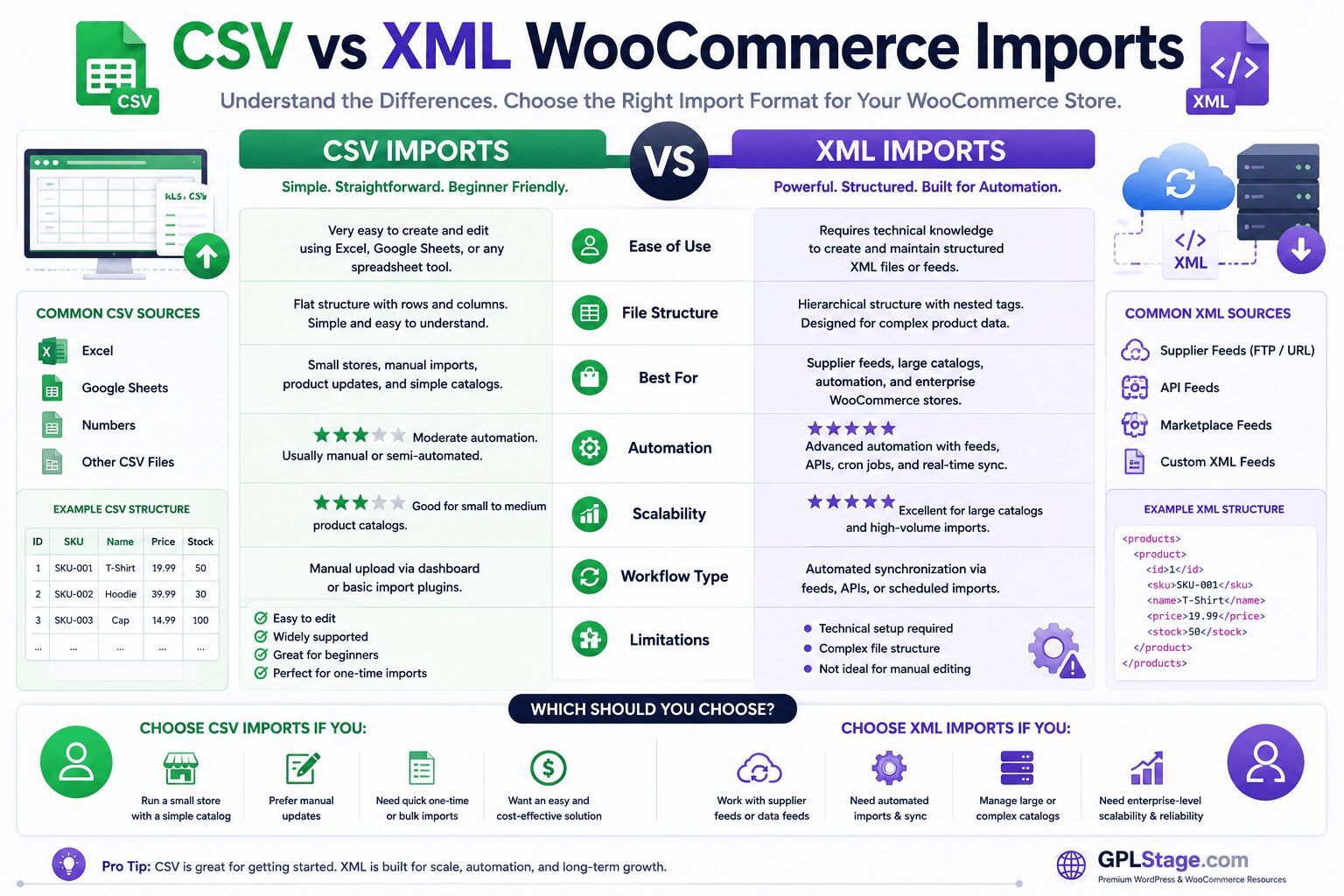
CSV imports are usually best for smaller stores and manual workflows, while XML imports are designed for advanced automation, supplier synchronization, and enterprise WooCommerce operations. Understanding these differences helps store owners choose the right import strategy before selecting a WooCommerce import plugin.
Common WooCommerce Product Import Problems
Duplicate Products
This usually happens because:
- SKUs are mismatched
- product IDs are missing
- import rules are configured incorrectly
Product Images Not Importing
Common causes include:
- invalid image URLs
- blocked remote requests
- timeout limits
- memory exhaustion
Variable Product Errors
Variation imports often fail because:
- attributes are mapped incorrectly
- parent products are missing
- SKU relationships break
Timeout Errors
Large imports can exceed:
- PHP execution time
- server upload limits
- memory allocation
This is especially common on low-quality shared hosting.
As WooCommerce stores grow, manually managing product catalogs becomes increasingly difficult and time-consuming. The comparison below shows how automated WooCommerce product management workflows improve inventory synchronization, reduce errors, and simplify large-scale store operations.
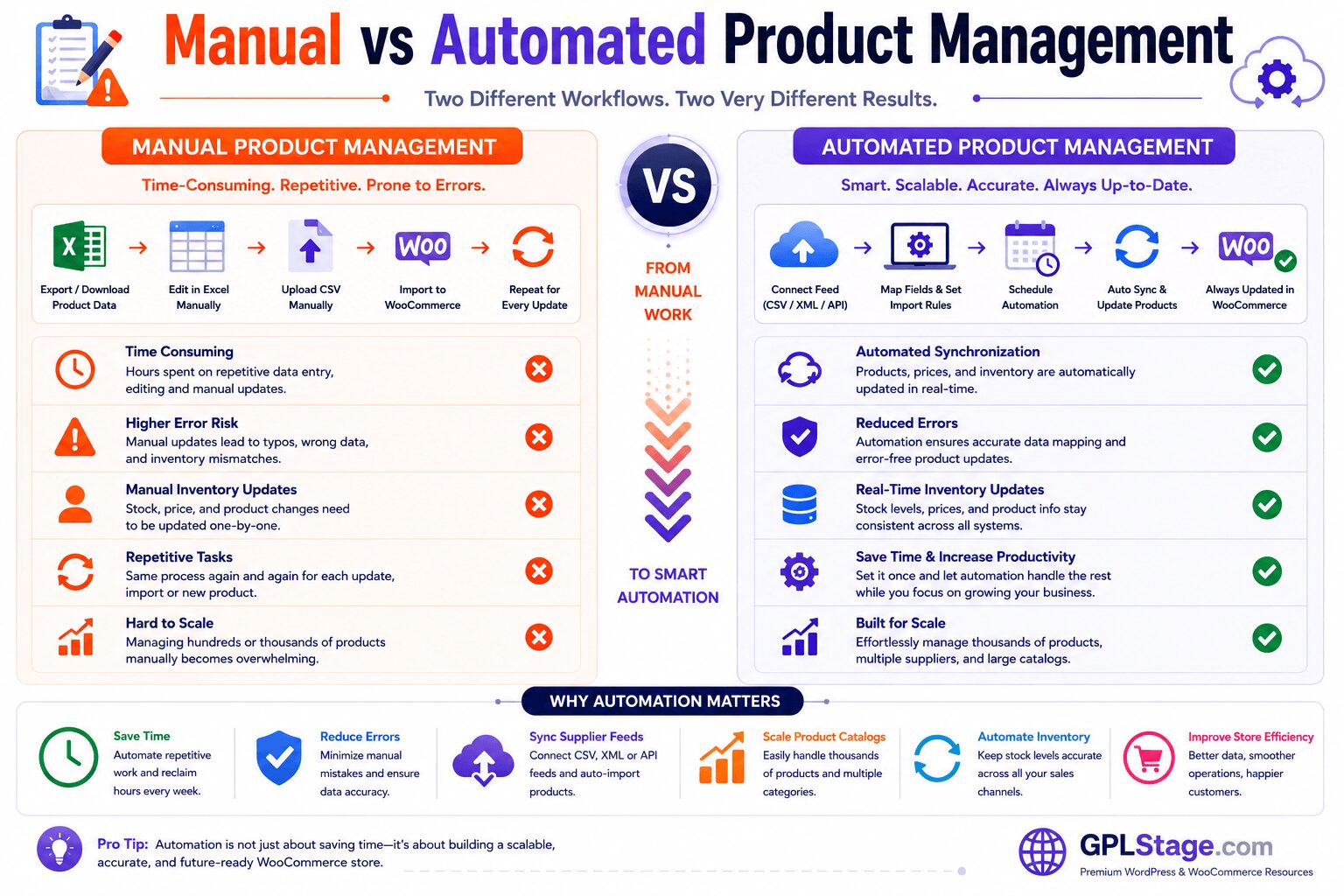
Modern WooCommerce automation systems help store owners synchronize supplier feeds, automate inventory updates, reduce repetitive tasks, and scale product catalogs more efficiently. This is especially important for stores managing large inventories, affiliate catalogs, or supplier-based workflows.
Related WooCommerce Workflows
WooCommerce product imports are closely connected to other operational workflows, including:
- inventory synchronization
- supplier feed automation
- bulk product editing
- WooCommerce exports
- affiliate catalog management
- migration optimization
Store owners managing large WooCommerce operations should also optimize:
- hosting performance
- database efficiency
- image processing
- cron scheduling
- inventory automation
These workflows become increasingly important as product catalogs scale.
Performance & Scalability Considerations
Large WooCommerce imports place heavy pressure on:
- PHP workers
- server memory
- database queries
- cron systems
- image processing resources
For stores managing:
- thousands of products
- large image libraries
- scheduled synchronization
- supplier feeds
…hosting quality becomes just as important as the import plugin itself.
Performance optimization strategies may include:
- increasing PHP memory limits
- splitting imports into batches
- optimizing image processing
- using server-side cron jobs
- upgrading WooCommerce hosting
Large WooCommerce stores require more than simple product imports. As catalogs scale, businesses need synchronized supplier feeds, automation systems, inventory synchronization, scalable infrastructure, and centralized product management workflows. The architecture diagram below illustrates how modern WooCommerce enterprise ecosystems operate efficiently at scale.
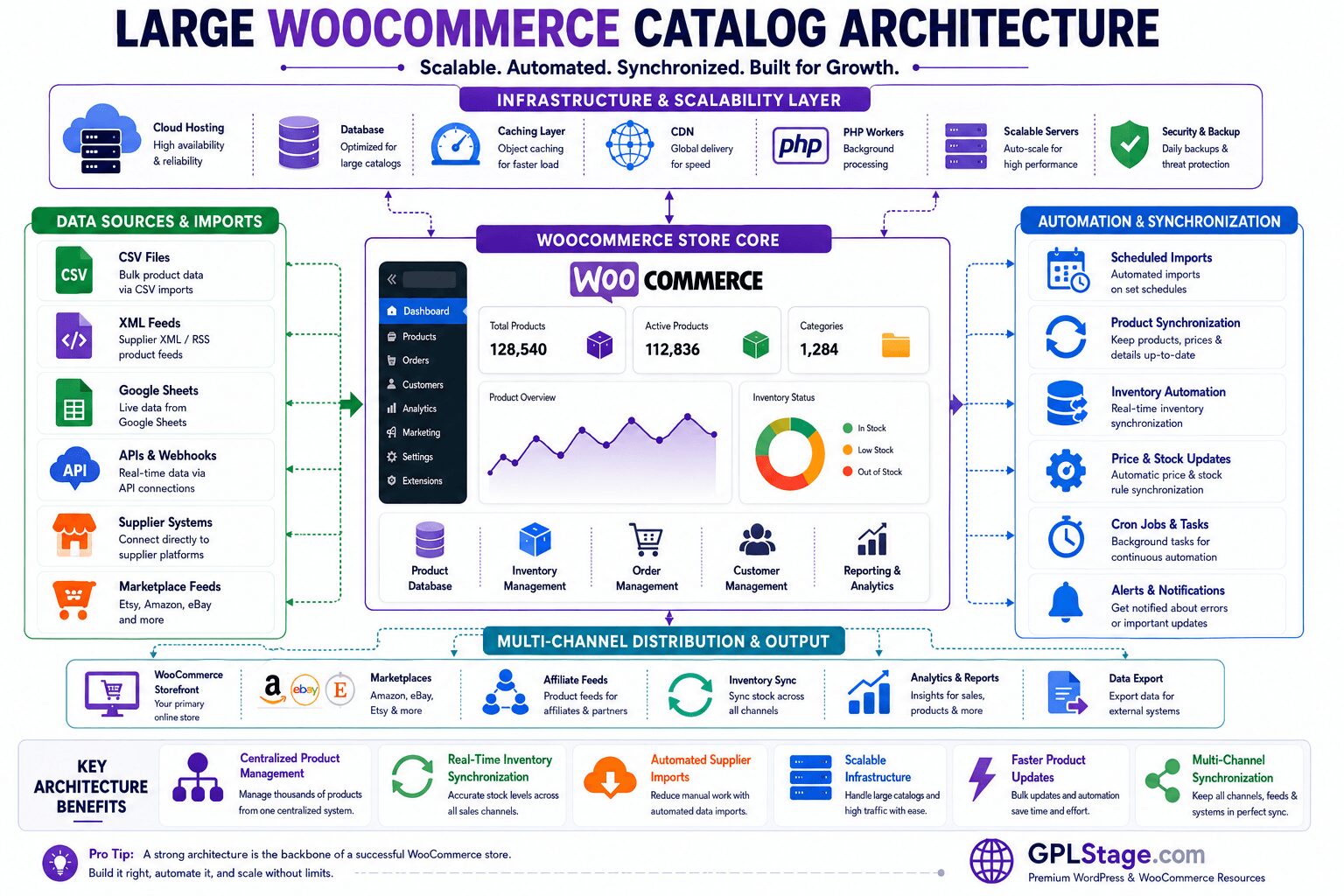
Modern WooCommerce operations rely heavily on automation, synchronization, scalable hosting infrastructure, and centralized catalog management. Enterprise-level stores often combine supplier feeds, APIs, scheduled imports, inventory synchronization, and multi-channel distribution systems to maintain operational efficiency while scaling product catalogs.
Final Verdict
For most advanced WooCommerce stores, WP All Import remains the best overall WooCommerce product import plugin because of its:
- flexibility
- automation capabilities
- XML support
- scalability
- enterprise-level workflow support
However, not every store needs enterprise-grade importing.
If you want:
- simpler workflows
- easier setup
- WooCommerce-focused importing
…Product Import Export for WooCommerce offers an excellent balance between usability and functionality.
Meanwhile, smaller stores can often manage perfectly well using WooCommerce’s built-in importer before investing in advanced import automation.
The best solution ultimately depends on:
- catalog size
- automation needs
- migration complexity
- supplier integrations
- technical experience
- scalability requirements
Choosing the right workflow matters far more than simply choosing the plugin with the most features.
Frequently Asked Questions
What is the best WooCommerce product import plugin?
WP All Import is generally considered the strongest WooCommerce import plugin for advanced workflows because it supports:
- XML imports
- automation
- scheduled synchronization
- complex mapping
- enterprise scalability
Can WooCommerce import products from CSV?
Yes. WooCommerce includes a built-in CSV importer that allows product importing and exporting directly inside the Products screen.
Which WooCommerce import plugin is best for large catalogs?
WP All Import is one of the best options for large catalogs because it handles advanced automation, supplier feeds, and scalable import workflows effectively.
What causes WooCommerce import timeout errors?
Timeout errors are commonly caused by:
- low PHP memory limits
- large image imports
- oversized XML/CSV files
- weak hosting environments
Is XML better than CSV for WooCommerce imports?
XML is generally better for automation and supplier synchronization, while CSV is simpler and easier for manual workflows.